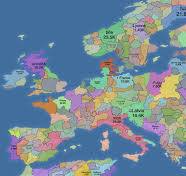
 open front
Popular Open Front Strategy Games
Bullet Heroes
Strike Force: Action Platformer
Wreck The Tower
Mecha Duel
Stickman Brawler
Dungeon Master Knight
Drunken Fighters
We Will Not Survive
Panda Dash Auto Shooting
Cars with Guns: Wasteland Showdown
GunGame Poligon Battle Royale
Zombie Survival Shooter
Battle Zone 2D
Zombie Last Survivor
Zombie Royale Io
Mine Shooter Monsters Royale
Last Standing
Radiation Zone
Open Front is a fast-paced multiplayer real-time strategy browser game where players fight for territory, build cities, form alliances, and race to control 72% of the map.
What is open front?
open front is a real-time strategy .io-style browser game focused on map conquest, economic growth, and tactical expansion.
Every match starts with a small territory. From there, you expand, defend borders, manage workers and troops, and react to human players and bots in real time.
How to win in open front
- Expand smartly: Capture nearby land, but do not overextend your military and leave your borders exposed.
- Grow your economy: Build cities and keep enough workers alive so your empire can keep scaling.
- Control the sea: Ports, warships, and trade routes create pressure far beyond your borders.
- Use diplomacy: Alliances can protect you, but betrayal and timing often decide the match.
- Reach 72%: The main victory condition is controlling 72% of the map before your rivals do.
Core buildings and weapons
- City: Raises your maximum population and lets your empire support larger armies.
- Defense Post: Slows enemy invasions and increases the cost of attacking your territory.
- Port: Unlocks naval pressure, sea travel, and profitable trade routes.
- Missile Silo: Launches devastating bombs against enemy territory when the timing is right.
- SAM Launcher: Intercepts incoming missiles and helps protect your late-game infrastructure.
Why players search for open front
- Real-time strategy depth: open front combines territory expansion, economy management, and military timing in every match.
- Large multiplayer battles: You can compete against large lobbies where alliances and betrayals matter.
- Browser-first convenience: You can jump into open front instantly without a heavy download or install process.
- Replayable matches: Different spawns, different neighbors, and different alliances keep every game fresh.
open front controls
- Move camera: W, A, S, D
- Zoom: Q / E or mouse wheel
- Select and attack: Left click to select, then drag toward adjacent territory.
- Radial menu: Right click to build, attack, send boats, or manage diplomacy.
- Center camera: Press C to focus on your territory.
- Alternate view: Press Space to switch between terrain and country view.
- Attack ratio: Hold Shift and left click, or use the slider to adjust troop commitment.
- Quick chat: Use preset messages and emojis to communicate during battle.